Verify any bank-statement extractor against the source PDF.
Your extractor (BanklyAi, Bankstatemently, ChatGPT, your own script) returns rows. The partner asks "where did this row come from?" — and you don't want the answer to be "trust the AI." Workpapertrails takes whichever vendor's output you feed it and binds every row back to its exact cell on the source PDF — green if it matches, red if it's hallucinated or silently dropped, gray if the source is unreadable. The verification layer that sits after any extractor.
Main flow · Verify any extractor
You already use an AI extractor. We make every row it returned trail back to the source PDF — or flag the ones that don't.
Drop the CSV your extractor produced (BanklyAi, Bankstatemently, ChatGPT, your own script) plus the source PDF. We bind every row back to its exact cell — green if it matches, red if it's hallucinated or silently dropped, gray if the source PDF is unreadable. Workpaper-ready PDF on export. Live proof: two real vendor outputs, one verification layer. See it on a real hallucination →
Bring your own extractor. We're the verification layer that sits after it.
Optional · One-tool path
Don't have an extractor yet? We can do extraction and verification in one pass.
Drop a PDF bank statement, get QBO-ready transactions where every row is already one click from the source cell. Same verification layer; we just provide the upstream extraction too. Try the one-tool demo →
If you'd rather skip the BYO-extractor step. Same trail-back layer underneath.
"Agentic systems can crush routine testing, but the 'who is responsible for the workpaper' question does not go away, and the failure modes get weirder — hallucinated evidence, silent tool errors, overconfident explanations. I would love to see more public detail on their controls, audit trails, and how they validate agent outputs."
KPMG is removing humans from routine audit testing this year. PwC and EY are following. The Big 4 are publicly forecasting 20-30% of audit work agentic by 2029. An audit trail that ties every line on a workpaper back to the source row on the source PDF is the layer that catches a hallucinated number — whether it was extracted by a parser, a human, or a 2029-vintage audit agent.
How it works
Upload a statement. Get clean data — and a paper trail.
Drag a PDF or CSV. Within ~30 seconds you have a normalized transaction table — dates ISO-8601, amounts signed, vendors canonicalized, categories suggested. The part you can't get from any of the other PDF-to-QBO tools: a one-click audit trail back to the source line.
| Date | Vendor | Category | Amount | |
|---|---|---|---|---|
| 2026-03-12 | Amazon | Office Supplies | −42.99 | 🔍 source |
| 2026-03-13 | United Airlines | Travel | −418.20 | 🔍 source |
| 2026-03-14 | Staples | Office Supplies | −87.41 | 🔍 source |
Source — page 3, line 17
03/12 AMZN MKTP US*A1B2C3 800-279-6620 WA 42.99-
In-app, this panel renders the actual PDF page with the source line highlighted in yellow. (Static text shown here for the demo.)
Cleaned record + transformations
{
  "date": "2026-03-12",
  "amount": -42.99,
  "vendor": "Amazon",
  "category": "Office Supplies",
  "confidence": 0.94
}
- paren_to_negative — trailing "−" → signed amount
- vendor_canonicalize — "AMZN MKTP US*A1B2C3..." → "Amazon"
- category_classify — suggested: Office Supplies
Revert any single transformation. Edit manually. Or sign off.
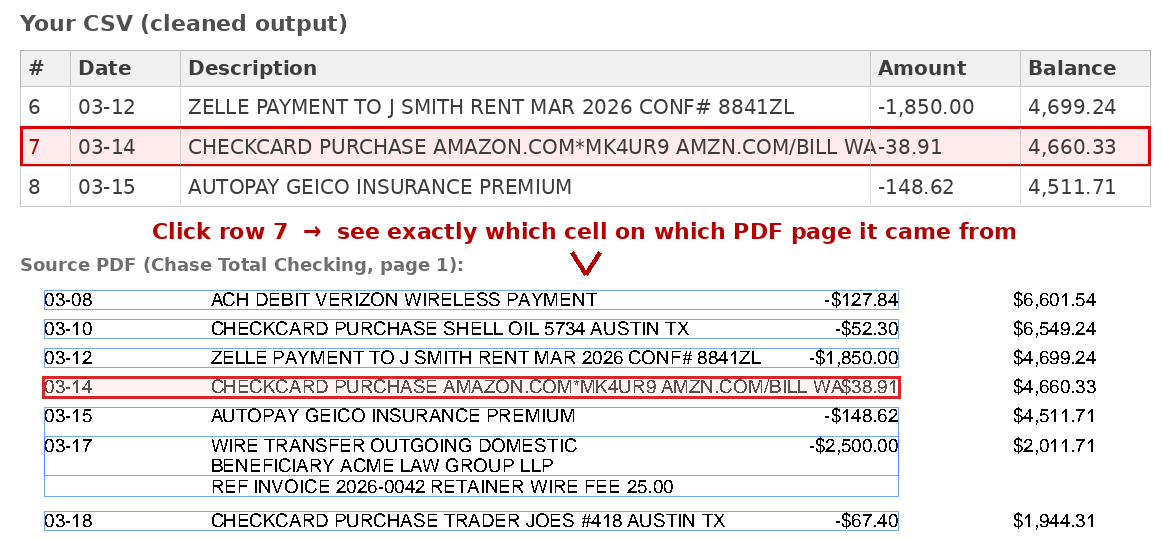
- Source-line traceback. Every cleaned transaction has a "🔍 source" link. One click opens the original PDF page with the source line highlighted. Confirm in two seconds without leaving the cleaned-data view.
- Diff view. Side-by-side: the raw extracted text from the PDF, then the canonicalized record. Every transformation is named — paren_to_negative, vendor_canonicalize, category_classify. Revert any single transformation.
- Reconciliation banner. "42 lines extracted · 42 cleaned · $14,232.18 raw = $14,232.18 cleaned · 0 unmatched" pinned at the top. Single-glance sanity check before you export.
- Export to QBO, CSV, or Excel. One click. Categories carry over.
- Per-client vendor and category memory. The vendor canonicalization table learns from your edits. After a few statements per client, suggestions are 95%+ correct.
Try it yourself
A live demo with three sample statements (Chase Sapphire, BofA Business Checking, Wells Fargo SMB). Click any 🔍 to see source-line traceback in action.
Why "defend in review"
Because your workpapers get audited — by your partner, by your firm, by the IRS, and (next) by an AI agent reviewing AI-generated work.
Most of the existing PDF-to-QBO tools transform the data and hand it back to you as a black box. That works fine — until a reviewer flags a transaction and you spend twenty minutes flipping back to the original PDF, eyeballing column positions, and trying to re-derive how a $42.99 line item became "Office Supplies." Or worse — you don't catch a mis-classified line at all because you stopped looking.
It gets sharper from here. We benchmarked three PDF-to-CSV converters against the routine US small-business statement shapes — clean single-account, multi-account split-cr/dr, embedded check images, redaction stripes, running-balance passbook. Every one silently produces wrong or empty output on at least one common shape: BanklyAi returns empty on the multi-account fixture with no warning. BSC merges the two accounts into one stream with no account column to disambiguate. Bankstatemently returns empty on the redaction-stripe fixture with no errors, warnings, or quality field populated. These are the same failure modes — hallucinated evidence, silent tool errors, overconfident explanations — that the r/Accounting top comment named for AI-driven audit work. They're already happening with no agent in the loop. A fourth tool at the same price tier (DocuClipper, $39/200pg) auto-parses well but the review screen is spreadsheet-only — no source-PDF panel. The one tool with click-cell→source-PDF (DataSnipper) is firm-tier €49+/user/month Excel add-in and doesn't auto-parse bank statements. Nobody at the solo/SMB tier closes the loop.
Workpapertrails is built for the moment you have to defend the work. Every cleaned line points back to the exact source — the file, the page, the bbox, the raw extracted text, the named transformations applied. So review takes minutes instead of hours. And the broken-windows-theory question — "if I have to verify one line, do I have to verify all of them?" — never starts. As AI takes over more of the routine extraction, the same trail-back layer answers the same question for the agent's output that it answers for yours.
Voices from the field
The pain we're building for, in their own words.
Public posts from accountants and small-business owners describing the workflow we replace. Quoted verbatim; sources linked.
"If someone isn't paying attention to details like dates being wrong, old tick marks still being there, or notes that haven't been applicable for years, how can you trust they're going to pay attention to the details that actually matter?"
"I spend 2–3 hours every month cleaning bank statements before I can use them in Excel. Different date formats, garbage vendor names, amounts with parentheses… Am I the only one dealing with this? What's your workflow?"
"I thought to myself, no way this workbook isn't riddled with errors. I chased down every link and formula…"
Three quotes, three audiences, one pattern: the data lands clean enough — but the reviewer still has to re-perform the work to trust it. Workpapertrails closes that loop with a per-line audit trail back to the source PDF.
Who it's for
Built for
- Solo accountants doing client bookkeeping.
- Small-firm bookkeepers and tax preparers (1–10 seats).
- Virtual CFOs and outsourced controllers.
- Anyone whose monthly close starts with a stack of PDF statements that don't auto-connect to QuickBooks.
Not for
- End-user personal finance. (You'll be happier with Tiller or Monarch.)
- Mid-market AP departments processing 1,000+ invoices/month — you need a different category of tool.
- Firms whose entire stack is already on a Plaid-connected feed and never sees a PDF.
Pricing
One simple price. No per-statement charges. No seat tax in v1.
Pricing below reflects the founding-cohort beta. Final pricing locks once we exit private beta.
| Your option | What it costs | What you get |
|---|---|---|
| Manual entry into QBO | $0 cash + 30–60 min/statement |
You eyeball every line. Defensible, but slow — and your hourly rate is the cost. |
| BanklyAi / DocuClipper / generic PDF-to-QBO converters | $10–$50/mo per user |
Fast extraction. No audit trail. When a reviewer flags a line, you re-open the PDF and ctrl-F. We benchmarked: on a routine multi-account statement, BanklyAi returns an empty CSV with no error and BSC merges both accounts into one stream with no account column — silent failures the reviewer has to spot manually. DocuClipper at $39/200pg is the most format-complete (QBO/Xero/Sage/NetSuite) but the review screen is spreadsheet-only. |
| DataSnipper (audit-firm Excel add-in) | €49+/user/mo firm-tier |
The one tool with click-cell→source-PDF as a core feature ("full traceability"). Right tool for regulator-facing audit testing already in Excel. Two qualifiers: (1) bank statements are a supported input, not an auto-parsed product — manual snip each row; (2) Excel-only output, no QBO push. |
| ChatGPT / Claude on a redacted CSV | $0–$20/mo if you already pay for the AI |
Works for one statement. You redact PII by hand each time, paste in your import template, paste the result back. No traceback to the source PDF, no reconciliation check, no per-client memory. |
| Hubdoc / Dext / Receipt Bank | $20–$45/mo per user, often bundled with Xero |
Receipt-capture-first. Bank-statement support is secondary; audit trail is per-document, not per-line. |
| Workpapertrails — founding (private beta) | $19/mo solo seat · locked for life · founding cohort only |
Full app + the audit-trail differentiator. Founding cohort price locks for the lifetime of the account; post-beta pricing will be higher. |
Founding-cohort pricing ($19/mo) is locked for life of account for the first 20 firms on the waitlist. Per-seat pricing for firms (2+ seats) is a v1.1 question.
Get on the waitlist
Founding cohort closes at 20 accounts.
The first 20 firms on the waitlist get private-beta access, founding pricing locked for life, and a 20-minute call with the builder to shape the v1 vendor + category defaults around your client mix.
No spam. One email when the beta opens. We'll ask 3 questions: what accounting software you use, how many client bank statements you process per month, and what your biggest current pain is.
FAQ
Likely questions.
How is this different from BanklyAi, DocuClipper, or the other PDF-to-QBO converters?
Same input (PDF or CSV statement), same output (QBO-ready transactions). The difference is the audit trail — every cleaned line is one click from the source line in the source PDF, with the named transformations spelled out. At the solo/SMB auto-parsing tier we benchmarked (BSC, BanklyAi, Bankstatemently, DocuClipper) the review screen is spreadsheet-only and the source PDF lives in a different tab. We hand it back with a per-row paper trail.
What about DataSnipper? Don't they already have "full traceability"?
Yes — at the audit-firm tier. DataSnipper's "snip" feature is exactly click-cell↔rectangle-on-PDF, and it's the right tool if you're already in Excel doing regulator-facing audit testing. Two qualifiers: (1) bank statements are a supported input, not an auto-parsed product — the workflow is manually snip each row, not load-the-PDF-get-categorized-rows; (2) output is Excel, no QBO push, and entry pricing is €49/user/month firm-tier. Workpapertrails is the auto-parsing-bank-stmt → QBO version of that idea, at solo/SMB pricing.
What does the benchmark say?
We ran three converters (BankStatementConverter, BanklyAi, Bankstatemently) against the routine US small-business statement shapes a CPA hits on a normal Tuesday: clean single-account, multi-account split-cr/dr, embedded check images, redaction stripe, running-balance passbook. On the clean US single-account fixture, all three clear ~95–98% field accuracy. On the multi-account fixture, BanklyAi returns empty with no error, BSC merges both accounts into one stream with no account column, Bankstatemently is the only one that exposes per-row accountId. On the redaction-stripe fixture, BSC is the only one that returns a hard error — Bankstatemently returns empty transactions: [] with no errors / warnings / quality field populated. None of the three surface a per-line audit trail back to the source PDF cell. We separately confirmed DocuClipper ($39/200pg, our price-twin) — their own help docs and bank-statement-converter solutions page describe the review step as a spreadsheet-only Transactions table with a "reconciliation check" that ties extracted-row totals to the printed opening + closing balances. That catches a missing row or an arithmetic-breaking OCR error, but it can't catch a transposed amount where the totals still tie or a wrong description filed under the wrong account. No source-PDF panel. And DataSnipper (€49+/user/month audit-firm Excel add-in) has the click-back-to-PDF UX, but as a manual snip workflow, not auto-parsed bank-stmt → QBO. Try the demo to see the audit-trail flow.
I already paste my CSV into ChatGPT or Claude. Why not just keep doing that?
For one client, one month, ChatGPT-on-CSV works fine. The cost shows up at scale: you redact PII for every statement by hand, you re-paste your import template each time, you copy the AI's answer back into Excel — and when a reviewer flags a line you have nothing to point at. No source-PDF link. No named transformation. No reconciliation check. Workpapertrails runs the same extraction with a per-client vendor memory, an end-to-end reconciliation banner, and the audit trail the AI doesn't give you.
What banks and statement formats are supported?
v1: any text-extractable PDF (most major US banks — Chase, BofA, Wells, Capital One, Amex, plus most regional banks and credit unions) and any CSV export. Image-only / scanned PDFs work via an LLM fallback at slightly higher per-statement cost. We'll publish a tested-format list before beta opens; if your bank isn't on it, you can send a redacted sample at signup and we'll add it.
Where is my data stored? Can I run this on-prem?
Hosted SaaS in v1, US-region. Data is encrypted at rest, retention is configurable per account, and we never train models on your data. On-prem / self-hosted deployment is a stretch goal for v1.1 if there's demand from regulated firms — flag it on signup if it matters.
Does it connect to QuickBooks via the API, or do I export and import?
v1 is export-and-import (QBO IIF / CSV / Excel). Direct QBO API push is on the v1.1 roadmap once we validate the export workflow with the founding cohort.
What about Xero, Sage, FreshBooks?
v1 ships QBO-flavored exports. Xero CSV is straightforward to add — likely v1.1. Sage and FreshBooks depend on customer demand; flag your tool on signup.
Can I try it before paying?
Yes — two ways. (1) The live demo shows the click-through audit-trail flow on three sample statements, no signup. (2) The private beta is free for 30 days, no card required, with your own statements.
Who's building this?
An independent team focused on a single problem: making bank-statement workpapers reviewable in minutes instead of hours. Every founding-cohort account gets a direct line for feature requests, bug reports, and beta feedback.